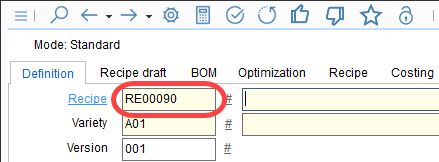
Numbering conventions for generating numbers of all data objects can be set in Administration/General/No. systems. A numbering system can be defined by:
•Length of the number
•Prefix
•Value
•Suffix
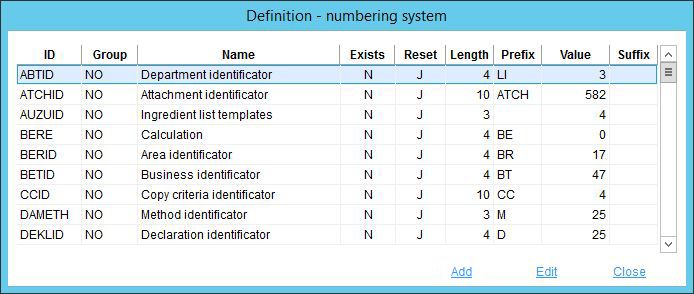
•ID: The data object code (SpecPDM identification).
•Group: This column is obsolete and will be removed in future releases.
•Name: The name of the data object.
•Exists: This column is obsolete and will be removed in future releases.
•Reset: J/N - When N is selected, the numbers are generated without empty place values (e.g. P000103 becomes P103).
•Length: The length of the number (without prefix/suffix positions).
•Prefix: The prefix of the code.
•Value: Shows the last number generated by SpecPDM.
•Suffix: The suffix of the code.
•Add: Add new definition.
•Edit: Edit selected entry.
•Close: Close the dialog.
To insert a new numbering definition, click on Add and fill in all missing data. To modify an existing numbering definition, double-click the respective object or right-click the object and select Edit. Edit the object and click OK to save changes. The changes will be applied immediately. The following example shows a modified numbering convention for the Recipe module.
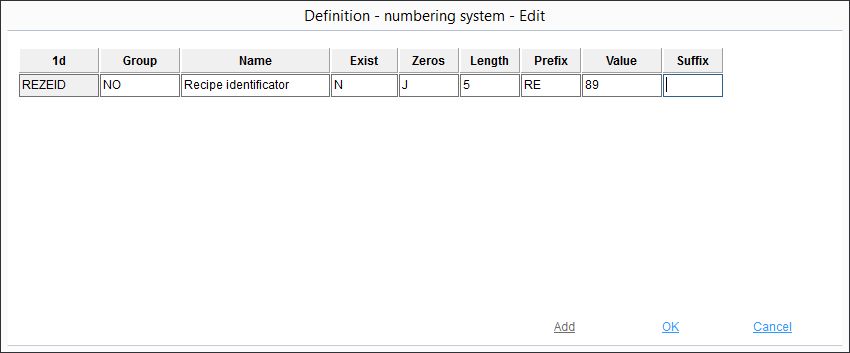
Now, all newly created recipes will use this predefined numbering convention.